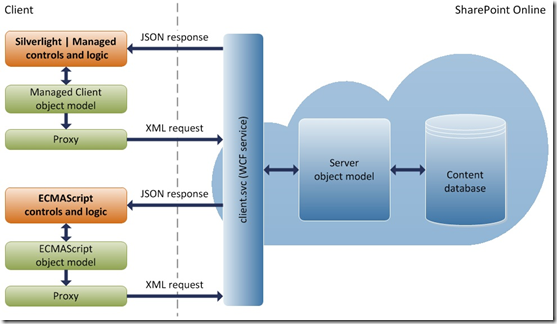
The SharePoint Client Object Model allows common SharePoint operations to be performed using a simple lightweight Webservice – and so is very useful when working with Apps that integrate with SharePoint, such as Dynamics CRM and Portals.
Client Object Model – This was introduced in SharePoint 2010 and then carried over into future versions of SharePoint.
https://msdn.microsoft.com/en-us/library/office/ee537247(v=office.14).aspx
However if you use the SharePoint Object Model to allow your App or Service to upload Documents or other Files to SharePoint then you notice the following error:
Error whilst Uploading Document: The request message is too big. The server does not allow messages larger than 2097152 bytes.
This is because the Default Setting for the Client Object Model in SharePoint 2013 is to limit single uploads to around 2MB in size. (2,097,512 bytes)
To overcome this limitation, we have two options:
- Rework our integration to ‘chunk’ a file into several smaller uploads. (as opposed to a larger single upload)
- Raise the 2Mb limit in SharePoint using a PowerShell Script.
If we look at how we can raise this limit, we need to run the following script past the SharePoint PowerShell:
$ws = [Microsoft.SharePoint.Administration.SPWebService]::ContentService
$ws.ClientRequestServiceSettings.MaxReceivedMessageSize = 10485769
$ws.ClientRequestServiceSettings.MaxParseMessageSize = 10485769
$ws.Update()
This will raise the maximum upload size to 10MB for the Client Object Model.
(not to be confused with general SharePoint Uploads which are controlled by the relevant setting in the Sites Virtual Application or individual Document Library)
With this place, we can now see our larger uploads via the Client Object Model taking place successfully:

The Client Object Model and Client-side Services are great components of SharePoint, and so the following articles and further reading may well be useful information on the topic.
Further Reading
Understanding the SharePoint 2010 Client Object Model
https://www.nothingbutsharepoint.com/2011/01/20/understanding-the-sp2010-client-object-model-aspx-2/
SharePoint 2013 .NET Server CSOM, JSOM and REST API Index
https://msdn.microsoft.com/en-us/library/office/dn268594.aspx
Using the Client Object Model